TL;DR
| Dimension | Zapier (managed) | Self-hosted automation |
|---|---|---|
| Pricing model | Per task / operation | Per VPS + maintenance |
| 50k ops/month | ~$449/month | ~€8–15 VPS + maintenance |
| Logic complexity | Limited | Loops, recursion, custom code |
| Data residency | Their servers | Your infrastructure |
| Maintenance | Zero (managed) | Real (security, backups, upgrades) |
| Custom integrations | Marketplace-only | Anything with an API |
| Right call when | <5k ops, simple flows, no ops team | High volume, GDPR pressure, complex flows |
The cost gap is real but maintenance and oncall cost are also real — the comparison only makes sense once you price both sides honestly.
The question every client asks
“Why not just use Zapier?” It’s the most common question when we explain our approach.
Short answer: cost and flexibility. The long answer is this article.
Real cost comparison at scale
Let’s take a service business with these monthly needs:
- 50,000 automated tasks/operations
- 20 active workflows
- Complex conditional logic
- Integration with custom APIs
Zapier
| Plan | Operations | Price/month |
|---|---|---|
| Starter | 750 | $29 |
| Professional | 2,000 | $73 |
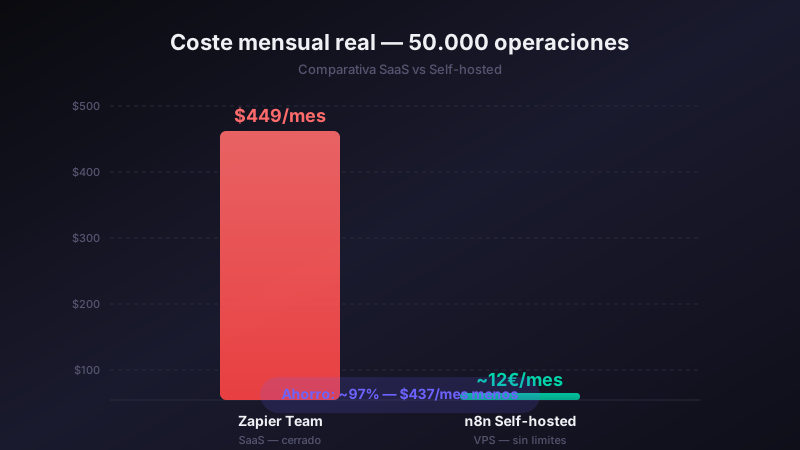
| Team | 50,000 | $449 |
For our use case: $449/month or $5,388/year.
And that’s assuming you never exceed the limit, don’t need complex multi-step logic, and don’t require premium features.
Self-hosted automation platform
| Item | Monthly cost |
|---|---|
| VPS (4GB RAM, 2 vCPU) | €8–15 |
| Technical maintenance | Included in our service |
| Total | €8–15/month |
Difference: €420–440/month. Over €5,000 a year.
But cost isn’t everything
The cost argument is the easiest one to make, but there are equally important technical reasons:
Technical flexibility
Zapier is designed for non-technical users. That’s an advantage in many cases, but a limitation when you need:
- Complex logic: loops, recursion, sophisticated error handling
- Data processing: complex transformations, aggregations
- Custom integrations: if an app doesn’t have a Zapier connector, you’re stuck
- Your own code: a self-hosted platform lets you run JavaScript or Python directly inside a workflow
Full data control
With Zapier, your data passes through their servers. With a self-hosted solution, data never leaves your infrastructure. For businesses handling sensitive data (healthcare, legal, financial), this can be decisive for GDPR compliance.
No artificial limits
Zapier limits the number of workflows, steps per zap, execution frequency… A self-hosted platform has none of these restrictions.
Is Zapier fully hosted?
Yes. Zapier runs entirely on their cloud — there is no first-party self-hosted edition. You sign up, configure your zaps in their UI and they execute on Zapier’s infrastructure. The official answer to “is Zapier self-hosted?” is no, and it never has been.
This matters for two reasons:
- Data residency: every event flowing through a zap passes through Zapier’s servers. For regulated sectors (healthcare, legal, financial services under GDPR), that’s a compliance vector to document.
- The “self-hosted Zapier” search: people googling this phrase are usually looking for an alternative they can run themselves. The honest answer is: there isn’t a self-hosted Zapier — what exists are alternative platforms (n8n, Activepieces, Windmill, Huginn) that play in the same automation space but with a different operational model.
Hidden costs of self-hosted automation tools vs Zapier
The headline price difference (~€430/month) is real, but a fair comparison has to count what self-hosting actually costs beyond the VPS bill:
- Initial setup time — installation, networking, SSL, queue configuration, monitoring. Budget 4–8 hours for someone who’s done it before, 1–2 days for someone who hasn’t.
- Updates and security patches — automation platforms ship security updates regularly. Skipping them means CVE exposure; applying them means scheduled maintenance windows.
- Backups and disaster recovery — Zapier handles this transparently. Self-hosted means you need a backup strategy, off-site copies and a tested restore procedure.
- Monitoring and alerting — when a workflow fails at 3am, you need to know. That’s an uptime monitoring tool plus an oncall rotation.
- Database growth and storage — execution logs grow fast. You’ll need a retention policy and storage cost forecasting.
- Skill replacement risk — if the person who set up your self-hosted stack leaves, who maintains it? Document or pay external maintenance.
- Lost-time cost when something breaks — Zapier’s status page is their problem. Your VPS going down at month-end is your problem.
A €15/month VPS doesn’t tell the whole story. A realistic loaded cost for a small business is closer to €40–80/month once you include managed backups, monitoring, and a few hours of skilled time per quarter. That’s still well below Zapier at scale, but the gap is narrower than the raw VPS number suggests.
When does Zapier make sense?
Being honest: Zapier is still a valid tool for simple use cases.
It makes sense if:
- You only need very basic automations (2–3 steps)
- You have no technical resource to manage a server
- Your operation volume is low (<5,000/month)
- You’d rather pay more in exchange for maintenance simplicity
Our recommendation
For growing businesses with more than 10,000 monthly operations or complex integration requirements, a self-hosted automation stack can make sense when maintenance is properly handled.
The decision should be compared with your own numbers: platform cost, maintenance, task volume and workflow criticality.
Related articles
- Admin dashboard for managing multiple client automations — How we monitor all our clients’ automations from a single panel, built on the same self-hosted stack.
- Custom session management dashboard for personal trainers — An example of a bespoke panel on a self-hosted stack: the kind of project that should be assessed beyond price per task.
Want to see the numbers applied to your specific case? Book an audit and we’ll do the calculation together.