
Many personal trainers manage 20, 30 or more active clients with some combination of Excel, phone notes, and WhatsApp threads. It works until it doesn’t: an unconfirmed session, a duplicated client, lost notes, no overview.
This article documents the system we built to solve exactly that. No paid SaaS. No CRM with features that never get used. A custom dashboard, built to spec, live in under 48 hours, with a running cost of less than €5 a month.
The problem with managing clients as a personal trainer
Zac runs a stable client base in Barcelona with strong results. His problem wasn’t the training — it was everything around it: knowing what sessions he had that week, with whom, at what time, and whether they were confirmed.
The diagnosis when he came to us:
- Outdated Excel: the real data lived in his head or on his phone, not in the spreadsheet
- Duplicated clients: the same number entered in different formats created separate profiles with fragmented history
- No overview: impossible to see at a glance what the coming week looked like, which clients hadn’t booked in a while, or how many cancellations there had been that month
The goal was clear: one place for everything, accessible from any device, nothing to install.
What the session management dashboard does
Main view: today, this week, and history
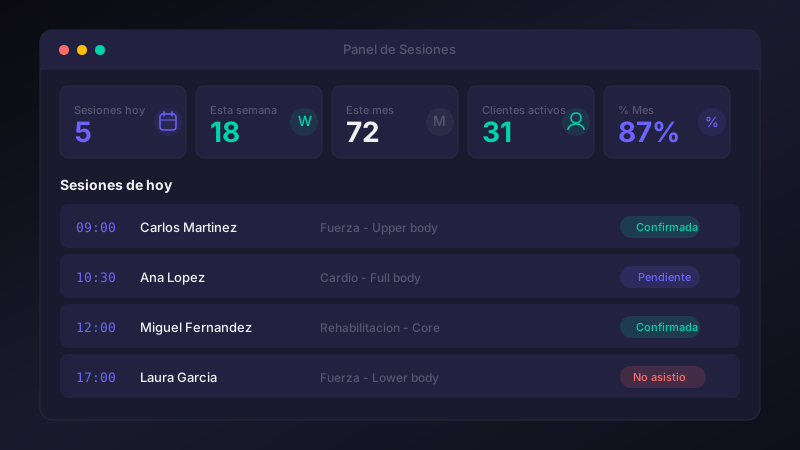
The home screen shows in real time:
- Today’s sessions with exact time, training type, and current status
- Next 7 days to anticipate the week’s workload
- Collapsible history with the last 30 records
- 4 metrics at the top: sessions today, this week, this month, and active unique clients
Each session’s status — pending, confirmed, completed, cancelled, no-show — updates instantly with a dropdown that writes to the database without reloading the page.
Client profile in one click
Clicking on any client’s name opens their full profile:
- Total sessions, completed count, and date of last session
- Upcoming pending sessions
- History of past sessions with notes
- Editable notes field for the current session
- Call and open WhatsApp buttons linked directly to the registered number
- Direct access to schedule a new session for that client
Smart session registration form
The registration form is designed to reduce errors at the source:
- Client autocomplete: typing the name shows existing clients and the phone fills in automatically
- Phone normalisation: the system accepts any format (
643210000,+34 643 210 000…) and converts it automatically to international standard when leaving the field - Automatic name capitalisation: prevents inconsistent casing across records
- Hour selector in 5-minute steps: removes impossible times and defaults to the next round slot
Automatic client and session follow-up
The dashboard handles day-to-day visibility. The next layer is proactive follow-up: the system acts before you have to remember to act.
Automatic reminders before sessions
A workflow checks upcoming sessions periodically and sends the client an automatic message with the time, training type, and a confirmation option. If they confirm, the status updates in the dashboard. If there’s no response within a set window, the trainer gets an alert.
This eliminates the “are we still on for tomorrow?” conversations that cost many trainers 20–30 minutes a day.
Inactive client detection
Many drop-offs aren’t explicit: the client simply stops booking. With the data in the database, detecting this is trivial. The system automatically flags active clients who’ve gone more than 3 weeks without a session and generates a personalised message with their context: how many sessions they completed, when the last one was, what type of training they did.
Not a generic message. One that shows someone is actually paying attention.
Automatic weekly summary
Every Monday, before the day starts, the trainer receives a report with:
- Last week’s sessions: completed, cancelled, and no-shows
- Clients who’ve gone more than two weeks without a session
- Expected workload for the week ahead
No app to open. No report to generate manually.
The details you don’t notice until something breaks
Clean data from the start
During testing we found the same client appearing twice because the phone number had been entered in different formats on each occasion. Two separate records, fragmented history.
The fix has two parts: migrating existing data to merge duplicates, and automatic normalisation in the form so it can’t happen again. Whatever format a number comes in, it always leaves in the same standard format.
Security without compromising usability
Any tool that accepts free text and sends it to a database needs protection. Every API field goes through validation before reaching the database: numeric identifiers verified as such, enumerated fields with a closed list of permitted values, and free-text fields sanitised before any operation. The result is a robust system that doesn’t interfere with normal use.
Always up to date, no refresh needed
If the trainer registers a session on their phone and then opens the dashboard on a computer, the data is current automatically. The dashboard detects when it regains focus and updates without intervention.
Cost and implementation time
| Item | Detail |
|---|---|
| Development time | Under 48 hours |
| Infrastructure cost | < €5/month (shared VPS) |
| Software licences | €0 |
| App to install | None |
| Compatible devices | Any browser |
The stack is fully open source and self-hosted: n8n as workflow engine and API, PostgreSQL as the database, Caddy as proxy with automatic SSL, all running on a Hetzner CX23 VPS.
The data belongs to the client. It doesn’t pass through any third party. No vendor lock-in.
What type of business does this approach suit?
A bespoke tool like this makes sense when at least one of these is true:
- The problem doesn’t fit any existing SaaS exactly: generic CRMs have too much; trainer-specific apps typically cost €30–80/month for features that still don’t quite fit
- The data is sensitive: client information, session history, notes — better in your own infrastructure than on a third party’s servers
- The process changes frequently: a custom tool adapts to you; a SaaS adapts you to it
If you manage clients with your own schedule — personal trainer, physiotherapist, coach, consultant, private tutor — there’s very likely a version of this that makes sense for your specific situation.
Related articles
- 5 processes every dental clinic should automate — Reminders, post-treatment follow-up and patient reactivation: the same ideas applied to the dental sector.
- E-commerce automation: recover abandoned carts and build loyalty — How automated WhatsApp flows recover sales and retain customers in online stores.
Tell us how you work today and we’ll tell you in 15 minutes whether it’s worth automating.